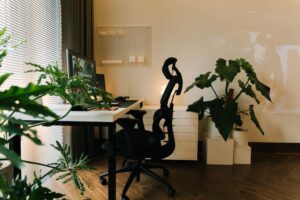

Setting up a home office that encourages productivity can make a significant difference in your workday. Whether you work remotely full-time or occasionally need a dedicated workspace at home, creating an environment that supports focus and comfort is key. Below, we share practical tips to help you design a productive home office tailored to your needs.
Choose the Right Location
Selecting the right spot for your home office is the first step toward productivity.
– Quiet and Low-Traffic Area: Pick a corner or room where you can minimize distractions and noise.
– Natural Light: Position your desk near a window to take advantage of daylight, which can improve mood and energy.
– Space Adequacy: Ensure the area is large enough to accommodate your desk, chair, and any equipment or files you need.
Invest in Ergonomic Furniture
Comfort plays a vital role in maintaining productivity throughout the day.
– Ergonomic Chair: Choose a chair that supports your back and encourages good posture.
– Adjustable Desk: Consider a desk that can be adjusted for sitting or standing to promote movement.
– Proper Desk Height: Your desk should allow your arms to rest comfortably at a 90-degree angle while typing.
Organize Your Workspace Efficiently
A clutter-free space helps reduce mental distractions.
– Declutter Regularly: Keep only essential items on your desk to maintain focus.
– Storage Solutions: Use shelves, drawers, or filing cabinets to store documents and office supplies neatly.
– Cable Management: Organize cords and chargers to avoid tangles and workspace clutter.
Optimize Lighting
Good lighting reduces eye strain and improves alertness.
– Layered Lighting: Use a combination of ambient light, task lighting (like a desk lamp), and natural light.
– Adjustable Lamps: Opt for lamps with adjustable brightness or color temperature.
– Avoid Glare: Position screens to prevent glare from windows or lights.
Minimize Distractions
A home office needs boundaries to keep distractions at bay.
– Set Boundaries: Inform family members or roommates of your working hours to limit interruptions.
– Use Noise-Canceling Headphones: These can help drown out background noise.
– Turn off Notifications: Mute non-essential apps and notifications during work sessions.
Personalize Your Space
Adding some personal touches can make your home office inviting and motivating.
– Plants: Incorporate greenery to improve air quality and reduce stress.
– Artwork or Photos: Decorate with inspirations or items that make you feel positive.
– Color Palette: Choose calming colors that suit your taste and promote focus.
Set Up Reliable Technology
Ensure your tech is dependable to avoid unnecessary interruptions.
– High-Speed Internet: A stable connection is crucial for remote meetings and research.
– Quality Hardware: Use a good monitor, keyboard, and mouse for comfort and efficiency.
– Backup Solutions: Keep important files backed up on cloud storage or external drives.
Establish a Routine and Breaks
Your environment supports productivity best when combined with good habits.
– Consistent Work Hours: Maintain regular start and end times to build discipline.
– Scheduled Breaks: Use techniques like the Pomodoro method to work in focused intervals with short rests.
– Physical Movement: Stand, stretch, or take brief walks to refresh your mind and body.
Maintain Good Air Quality and Temperature
Comfortable temperature and fresh air enhance concentration.
– Ventilation: Open windows when possible to let fresh air circulate.
– Air Purifiers: Consider using one if your space tends to feel stuffy.
– Temperature Control: Use fans or heaters to keep a comfortable temperature throughout the day.
—
Creating a productive home office is about balancing comfort, organization, and functionality. Implementing these tips can help you build a workspace that not only supports focus but also makes working from home an enjoyable experience. Remember that your ideal environment might evolve over time, so stay open to adjusting your setup as needed.