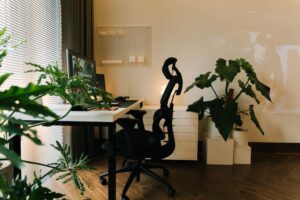

Creating a productive home workspace is key to maintaining focus and efficiency, especially as more people work remotely or split their time between home and office. A well-designed workspace helps minimize distractions, keeps you comfortable, and supports your daily tasks. This post walks you through useful tips to set up a home workspace environment that enhances your productivity.
Why a Dedicated Workspace Matters
Working from the couch or kitchen table might feel convenient, but it can decrease focus and increase distractions. A dedicated workspace signals to your brain that it’s time to work. It also helps establish boundaries between work life and personal life, which is important for mental well-being.
Choosing the Right Location
1. Find a Quiet Spot
Look for a space with minimal noise and foot traffic. If you live with others, inform them of your work hours to reduce interruptions.
2. Natural Light is a Plus
Position your desk near a window to take advantage of natural light. This can boost mood and reduce eye strain.
3. Consider Privacy Needs
If your work involves calls or video conferences, choose a space where you won’t be easily overheard or interrupted.
Optimizing Your Desk and Chair Setup
1. Prioritize Ergonomics
Invest in a comfortable chair that supports your back. Your feet should rest flat on the floor, and your knees should be at a right angle.
2. Desk Height and Layout
Your desk should allow your forearms to be parallel to the floor when typing. Keep the workspace clear and organized to prevent clutter.
3. Screen Positioning
Place your monitor at eye level, about an arm’s length away, to prevent neck strain.
Organizing Your Workspace
1. Declutter Regularly
A tidy desk reduces distractions. Use organizers, trays, or drawers to store office supplies and papers.
2. Use Storage Solutions
Shelves, filing cabinets, or storage bins keep important documents and tools accessible but out of the way.
3. Keep Essentials Within Reach
Items you use frequently—like your phone, notebook, or pens—should be easy to reach.
Lighting and Ambience
1. Combine Natural and Artificial Lighting
Besides natural light, add a desk lamp or overhead lighting to maintain good visibility during darker hours.
2. Choose Soft, Warm Lighting
Harsh lighting can cause headaches and fatigue. Soft, warm bulbs create a calming atmosphere.
3. Personalize with Color and Decor
Adding plants, artwork, or a colorful rug can make your workspace inviting while keeping it professional.
Technology and Tools
1. Reliable Internet Connection
Ensure your Wi-Fi is strong and stable to avoid interruptions during calls or when working online.
2. Invest in Quality Equipment
A good keyboard, mouse, headphones, and webcam improve comfort and communication.
3. Cable Management
Organize cables using clips or ties to prevent tangling and keep your desk neat.
Establishing Work Habits
1. Set a Schedule
Maintain regular work hours to create a routine that signals when to start and stop working.
2. Take Breaks
Step away from your desk every hour to stretch or walk around, helping to reduce fatigue.
3. Limit Distractions
Use apps or browser extensions to block distracting websites during work time.
Maintaining Your Workspace
1. Clean Regularly
Dust and wipe down surfaces weekly to keep your workspace hygienic.
2. Update As Needed
Adjust your setup if you experience discomfort or your needs change.
3. Reflect on Productivity
Periodically evaluate what works well and what doesn’t; tweak your environment accordingly.
Final Thoughts
Setting up a productive home workspace involves combining comfort, organization, and good habits. Even small changes can make a significant difference in your focus and work quality. By creating a dedicated, well-lit, and ergonomic environment, you’ll be better equipped to stay motivated and productive throughout your workday.
Try implementing these tips one step at a time to find what works best for you and enjoy a more effective work-from-home experience.